Back To Dynomation-6
Main Page
Back To DynoSim6 Main Page
|
FEATURE
FOCUS FOUR: |
|
|
Using Old Simulation Technology Is Never An Issue With DynoSim6 or Dynomation-6! We realize that you need the highest-quality tools to stay ahead of your competition. To give you an edge, Motion Software includes a powerful feature in Dynomation-6 and DynoSim6 (and some of our version-5 products, also) that automatically makes sure you are using the latest features and advances in simulation technology. Version-6 simulations include Motion's Automatic Software Update tool. No big deal; that's nothing new, you say! Well, you're right: The technology to deliver updates over the Internet is not new, but Motion Software has taken this technology to a new level! Motion "automatic updates" for go way beyond simple fixes! When our software checks for updates (you can manually initiate a update check at any time), it not only receives the usual bug fixes and minor enhancements, but it is often enhanced by entirely new features and modeling capabilities. In fact, Motion Software, Inc., has already rolled out more than 100 software enhancements (check out the "short list," below). Many of these new features have been requested by our users (yes, we really do listen to our customers!). If you use Dynomation-6 and you have an idea for a new feature or modeling enhancement, let us know. You'll probably see your requested feature "appear" in Dynomation-6 after the next update is download to your computer! Selected (from over 100) Automatic Updates Distributed FREE To Dynomation-6 and DynoSim6 Users (up to version 6.02.14 released 11/2018):
After you install Dynomation-6 or DynoSim6, it will automatically update with all the latest features, enhancements, bug fixes, and even User Manual updates. Every 30 days, the software will check our servers to make sure your simulations stays up to date (you also can check for new versions any time you wish).
|
Over 100 program enhancements have already been distributed to Version-6 users for FREE! Version-6 Simulations keep you up to date with the latest technology and program features, automatically!
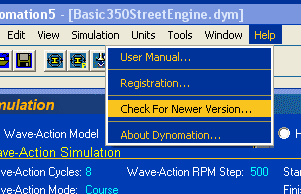
Update your software automatically by simply selecting Check For New Version in the HELP menu. If you forget, Dynomation-6 will remind you once a month to get the latest updates.
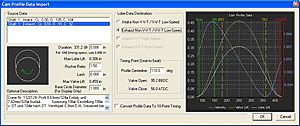
New Cam Profile Import Dialog in version 5.08, including a graph that shows all lobes in the file, their specifications, acceleration curves (helps pick out bogus data) and more. Imports a variety of Cam Profile formats!
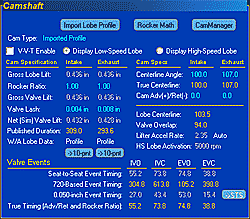
The Camshaft Component category receives a major facelift in version 5.07. Now you'll never "accidentally" switch from profile to 10-point timing. Despite the many new Profile File modeling enhancements, you can still simulate an engine with as little as 0.050 event timing if that's all the data you have. And using the CamMath calculator, you can even get by with just duration, centerline, and lift values! The new layout puts Power where you need it and removes the confusion.
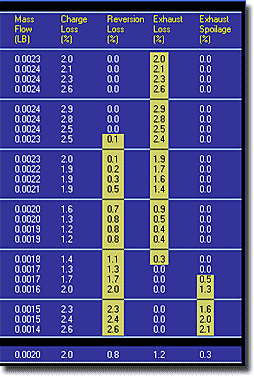
Dynomation displays charge- and fuel-flow data in tables, graphs, and ProPrint reports. A quick glance at the Charge-Loss Percentage values gives you an instant view of where in the rpm range these otherwise-mysterious flows take place. By adjusting valve opening and closing points, performance and efficiency can be markedly improved. For more information, see our Feature Focus: Update Charge-Flow Analysis.
|
|
Back To Dynomation-6 Main Page Back To DynoSim6 Main Page |
|
| Motion Software, Inc. Contact Info: | |
Motion Software, Inc. 222 South Raspberry Lane, Anaheim, California 92808-2268 714-231-3801 info@motionsoftware.com: General Questions latherton@motionsoftware.com: Lead Software Developer support@motionsoftware.com: Software Support |
|
| Send
questions or comments about this web site to latherton@motionsoftware.com. Copyright (c)
1997-2023 to present, Motion Software, Inc. All Rights Reserved. No part of this document may be reproduced without the explicit written permission of Motion Software, Inc. |